Epson Chip Resetter for 7 and 9 Pin Chips
Based in the UK Inkjet Direct supply Epson Chip Resetters and Zappers for epson inkjet printer cartridges
|
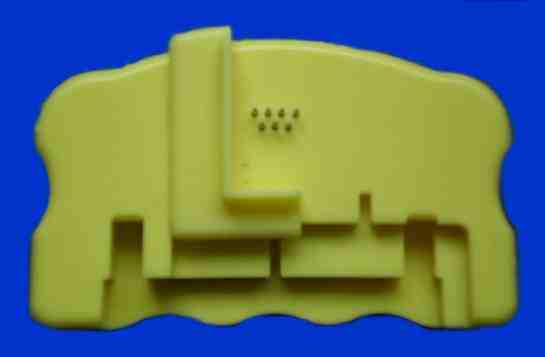
Chip Resetter for 9 Pin Chips | Chip Resetter for 9 Pin Ink Cartridges
£10.95 |
 |
|
OUR Chip Resetter
FOR EPSON CARTRIDGES WITH 9 PIN cHIPS - Epson Cartridges T711- T714 and T801
- T806 used in Stylus Photo D78 - D92 - D120 -
DX4000 - DX4050 - DX4400 - DX4450 - DX5000 -
DX5050 - DX6000 - DX6050 - DX7000F - DX7400 -
DX7450 - DX8400 - DX8450 - DX9400F - Photo R265 |
R285 | R360 | RX560 | RX585 | RX685 - S20 - S21 -
SX100 - SX105 - SX110 - SX115 - SX200 - SX205 -
SX210 - SX400 - SX405 - SX410 - SX415 - SX510W -
SX515 - SX600FW - These printers have a different 9 Pin chip from the previous 7 Pin Chips |
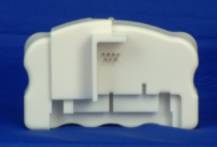
7 Pin Chip Resetter | YXD268 -Chip Resetter for 7 Pin Ink Cartridges
£10.95 |
|
| Chip Resetters FOR EPSON 7 AND 9 PIN CHIPS |
| CHIP RESETTING - CHIP REPROGRAMMING - REFILLING EPSON CARTRIDGES |
|
EPSON Chip Resetters | REFILLING EPSON CARTRIDGES | BULK REFILL INKS |
| The ink level of EPSON intelligent cartridge is recorded in the chip IC, which accurately records ink usage. Once the chip on the cartridge switches off the printer stops and cannot be used until a new cartridge is installed. Simply refilling with ink does not work - this can result in high printing costs. Which magazine recently demonstrated that by using a "Chip Re-setter alone to reset Epson chips gave between 17 and 38% more prints after the Epson cartridge chip had "switched off". Chip resetting is one solution to substantially lower running/printing costs and is described here:-
The YXD268 Resetter can reset & refill the chip IC on Epson intelligent ink cartridges, and does not alter the properties of the cartridge(s). Empty cartridges can then be reused repeatedlyfor multiple refills using the same black or colour cartridges and chips.
The YXD268 Resetter is versatile - it identifies the type of ink cartridge, and then automatically reprogrammes the chip on the cartridge- resetting it to "full" mode. It is compatible with Epson brand intelligent ink cartridges currently available. (List below) |
| |
| The
7 Pin Chip Resetter can be used on the following Cartridges Types:
T007 / T008 / T009 / T015 / T016 / T017 / T018 / T026 / T027 / T028 / T029 / T0321 / T0322 / T0323 / T0324 / T0331 / T0332 / T0333 / T0334 / T0335 / T0336 / T0341 / T0342 / T0343 / T0344 / T0345 / T0346 / T0347 / T0348 / T036 / T037 / TO37 / TO39 / T0421 / T0422 / T0423 / T0424 / T0441 / T0442 / T0443 / T0444 / TO452 / TO453 / TO454 / T0481 / T0482 / T0483 / T0484 / T0485 / T0486 / TO551 T0552 T0553 T0554etc |
The
7 Pin Chip Re-setter can be used on cartridges for the following Epson printers:
stylus Photo 780 785EPX 790 810 820 830 870 870LE 875DC 875DCS 890 895 900 915 925 935 950 960 1270 1280 1290 2000P 2100 2200 R200 R210 R220 R240 R300 R310 R320 R340 RX400 RX420 RX440 RX460 RX480 RX500 RX520 RX540 RX600 RX620 R800 R1800 D68 D88 DX3800 DX3850 DX4800 DX4850 and variants |
| Epson StylusColour 680 / 685 / 777 / 777i / C41 / C42 / C42+ / C42UX / C42SX / C43 / C44 / C46 / C48 / C50 / C60 / C61 / C62 / C63 / C64 / C66 / C70 / C70+ / C80 / C82 / C84 / C86 / CX3100 / CX3200 / CX3600 / Cx3650 / CX5100 / CX5200 / CX5400 / CX6400 / CX6600 and variants |
Instructions for use
Please note that the reset unit contains a number of notches, these are designed to couple with the various Epson black and colour chipped cartridges.
Reset Procedure:
1.Align the cartridge to the correct notch on the reset unit so that the chip contacts and the pins on the resetter meet.
2.Keep the two units in firm contact. If the red light is flashing, it shows the two units contact well.
3.When the red light turns to green, it shows the reset operation has been successful. |
 
4.The cartridge is now ready for refilling with ink.
To reset the newer slim epson ink cartridge used in StylusC64 / C66 /C84 / C86 / R200 / R300 / R800 / RX500 / RX600 / C70 / C80 / C82 / C84 / C86 and Stylus Photo 950 / 960 / 2100 and 2200 etc
The pictures (below) show, a plastic guide plate is included for positioning the cartridges used in the printers. When resetting these cartridges, the plastic guide plate should first be attached to the edge of the reset unit, as shown. The cartridge should then be brought up to the resetter so that the side of the cartridge is in contact with the plastic guide plate.  TROUBLESHOOTING1.After the red LED flashes, it stays on and doesn't turn green a). The pins on the resetter are not in good contact with the chip on the cartridge. The contacts may have dirt or residue on them. b). If the ink cartridge is not an original Epson brand ink cartridge, the chip may be not compatible with the resetter. c). If the ink cartridge is an original Epson brand ink cartridge, the chip may be burned out or Epson may have changed the chip design. The YXD268 Chip Resetter still can work with this kind of ink cartridge to reset the ink level, only the green light wont shine, the red LED does. 2.The printing quality is not up to standard a). The quality of the ink you are using may be inferior. We recommend using inks that are specifically matched to Epsons original colors and other characteristics. (Especially if you are printing digital photographs and expect to achieve matching colours.) b). Air bubbles trapped in ink. To avoid this, inject the ink VERY slowly. Also, allow the cartridge to rest for 24 hours with the ink exit nozzles facing down before using. |
|
REFILL-INK |
EPSON
STYLUS Colour Tri Colour Printers |
|
 |
EPSON REFILL
BLACK INK KIT
Contents
-
REFILL KIT - E900A
4
x
20mL Pre-Loaded syringes
of formulated Black ink to
match Epson - complete with instructions & Refill tips
This Kit is equal to 6-8
Black refills |
Black Refill Kit
£10.99
|
|
|
|
|
EPSON REFILL
3 Colour INK KIT
Contents
-
REFILL KIT - E900C
3 x
20mL Pre-Loaded syringes
of formulated colour C/M/Y inks to
match Epson - complete with instructions & Refill tips
This Kit is equal to 3-4
Colour refills |
Colour Refill Kit
£10.99
|
|
|
|
 |
Refill your Epson Photo colour
cartridges with this
REFILL KIT - E900P
20mL each Cyan -
Magenta - Yellow plus Photo
Cyan & Photo Magenta formulated to match Epson
Photo Colour
ink in pre-loaded syringes plus -
fine needles - complete
with instructions & Refill tips
This Kit is equal to 3-4 colour
refills |
Photo Colour Refill Kit
£12.99
|
|
|
|
 |
4 x 60mL - Top-up inks
Contains 1 - 60mL bottle of Black ink+ 60mL
each Cyan - Magenta & Yellow Colour ink bottles |
Top - Up inks
£23.99
|
|
|
| Spend over £30 and get Free delivery on inkjet cartridges and laser
printer consumables for HP, Epson, Lexmark, Canon, Compaq, Kodak,
Samsung, Xerox, Brother and BT. Remanufactured, compatible, refilled and
recycled cartridges are available from stock. |
Inkjet Direct offers refill
kits for colour printing, faxing, pc faxing, copying and scanning. Reduced
running costs with exceptional performance across its wide-ranges. Inkjet
printers can be more economically run by using the compatible inkjet
cartridge refill kits and inks - original Cartridges typically over double
the price of the refill kit and each refill kit has enough ink to fill the
cartridge from 2 - 8 times - it represents a potential huge saving |
|
|
|


Tel: 01578-730477
Tel: 01578-730478
Mobile: 07740 37 88 24
Whatsapp: 00447724720626

|
|
|
Brydon West LLP T/A Inkjet-Direct.com
Stowmill Stow Galashiels TD1 2RB
All Brand Names & Trademarks are acknowledged | E&OE Prices may vary
without notice
|




